> ## Documentation Index
> Fetch the complete documentation index at: https://docs.assetinfinity.ai/llms.txt
> Use this file to discover all available pages before exploring further.
# Inside an asset
> Every tab on a machine — health, hierarchy, work, maintenance, parts, meters, cover, failures, costs, movements, lifecycle, downtime, files, copilot and activity.
Everything known about one machine.
 ## Tabs
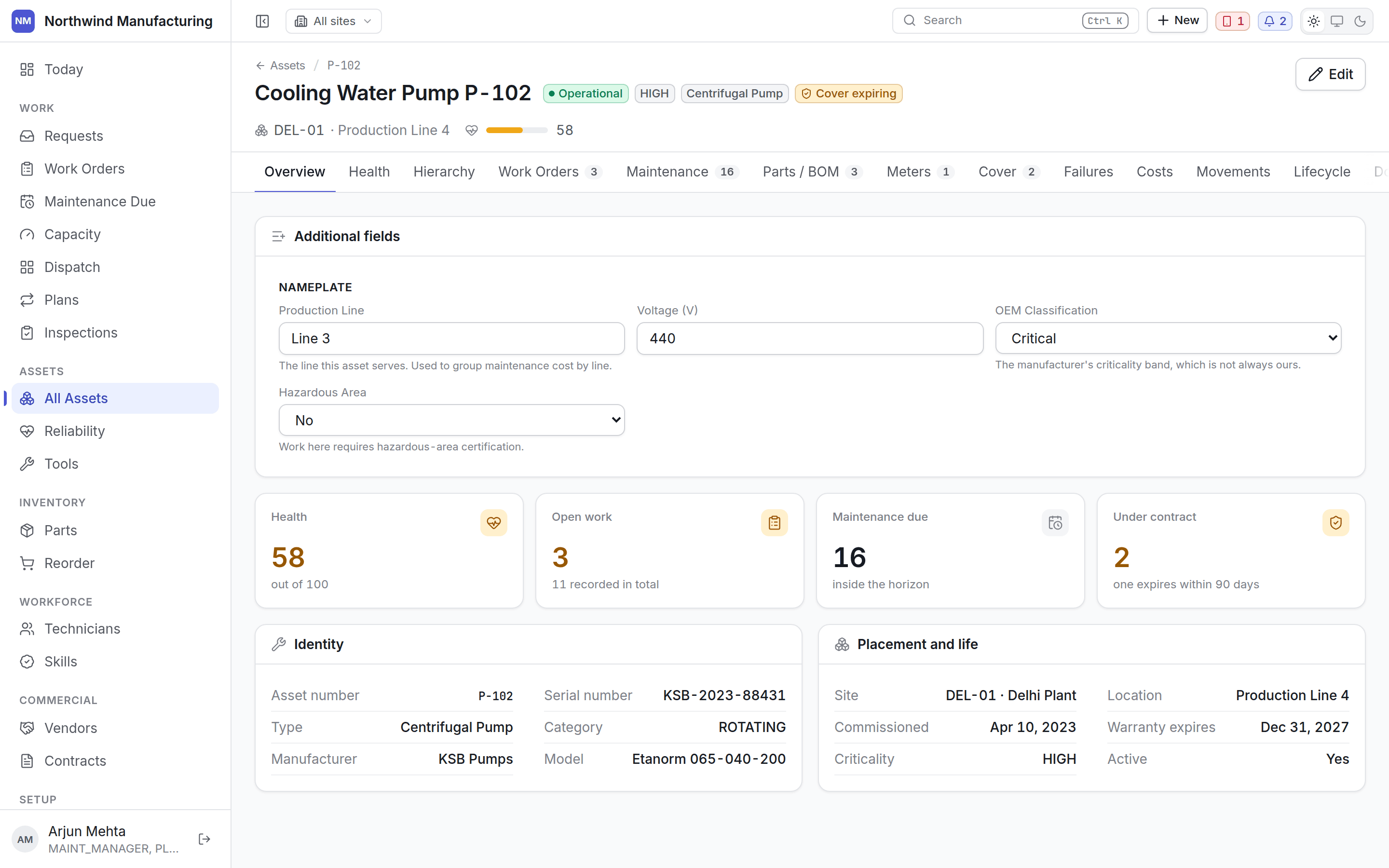
Identity and specification: number, name, type, category, criticality, manufacturer, model,
serial, location, parent, purchase cost and date, plus any custom fields your plant added.
The health score, and how it was arrived at.
## Tabs
Identity and specification: number, name, type, category, criticality, manufacturer, model,
serial, location, parent, purchase cost and date, plus any custom fields your plant added.
The health score, and how it was arrived at.
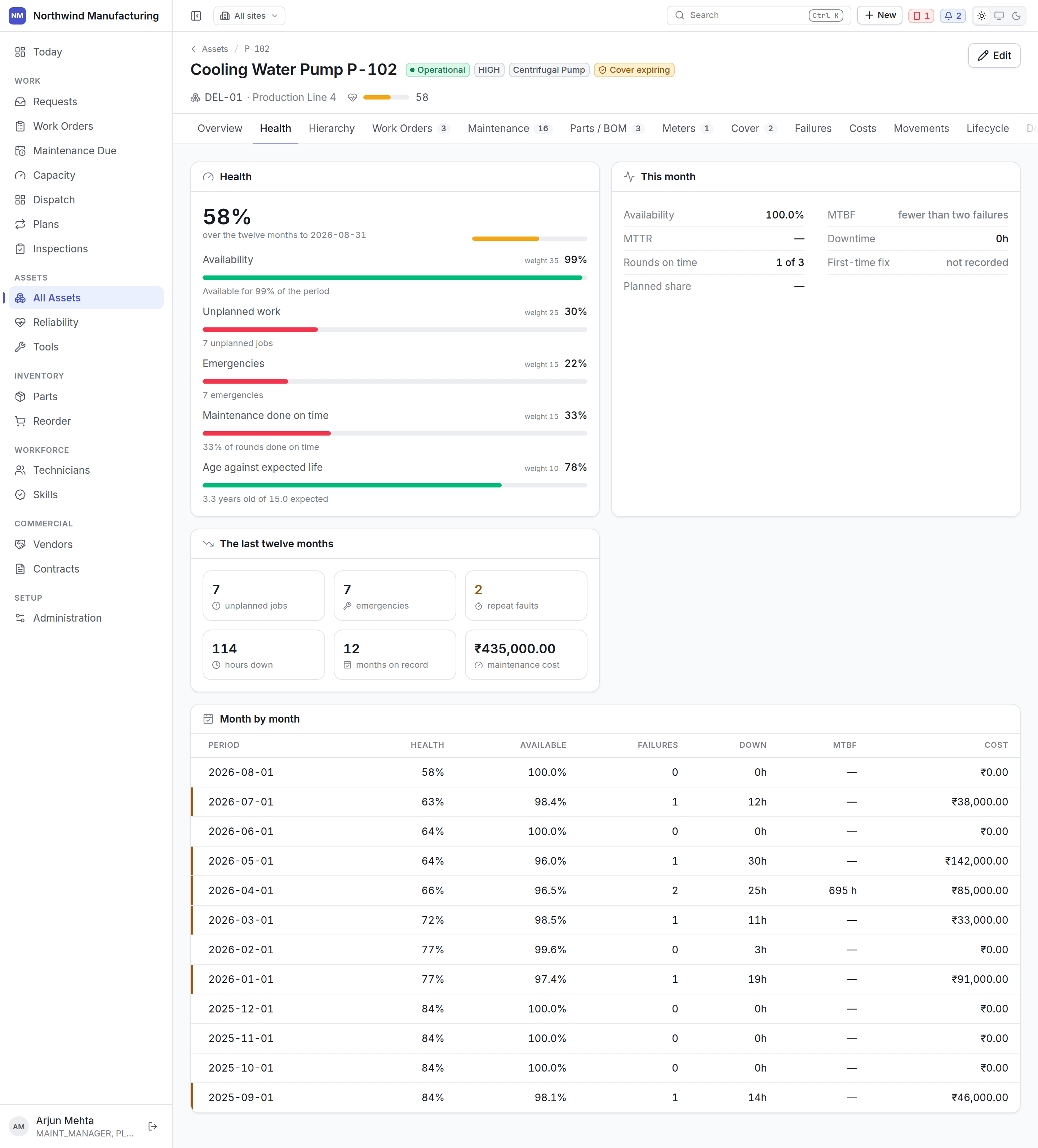 A score out of 100 built from failure history, downtime, age against expected life, and
maintenance cost against replacement cost. 80–100 is healthy, 50–79 is worth watching, below 50
is at risk.
The breakdown matters more than the number: a machine scoring 58 because it is old is a
different problem from one scoring 58 because it failed four times last quarter.
Where this asset sits — its parent, and everything below it. Work and cost roll up this tree.
Every job on this machine, open and historical, with a count on the tab. This is the machine's
repair history and the thing to read before deciding whether a fault is new.
Which [plans](/maintenance/plans) cover this asset and what is due next. Doing two rounds in one
release is usually cheaper than two shutdowns, and this is where you see the chance.
The bill of materials — which parts fit this machine. It is what makes "which filter does P-102
take" answerable at the store counter, and what lets planned maintenance forecast demand.
Run hours, cycles, production counts, temperatures.
A score out of 100 built from failure history, downtime, age against expected life, and
maintenance cost against replacement cost. 80–100 is healthy, 50–79 is worth watching, below 50
is at risk.
The breakdown matters more than the number: a machine scoring 58 because it is old is a
different problem from one scoring 58 because it failed four times last quarter.
Where this asset sits — its parent, and everything below it. Work and cost roll up this tree.
Every job on this machine, open and historical, with a count on the tab. This is the machine's
repair history and the thing to read before deciding whether a fault is new.
Which [plans](/maintenance/plans) cover this asset and what is due next. Doing two rounds in one
release is usually cheaper than two shutdowns, and this is where you see the chance.
The bill of materials — which parts fit this machine. It is what makes "which filter does P-102
take" answerable at the store counter, and what lets planned maintenance forecast demand.
Run hours, cycles, production counts, temperatures.
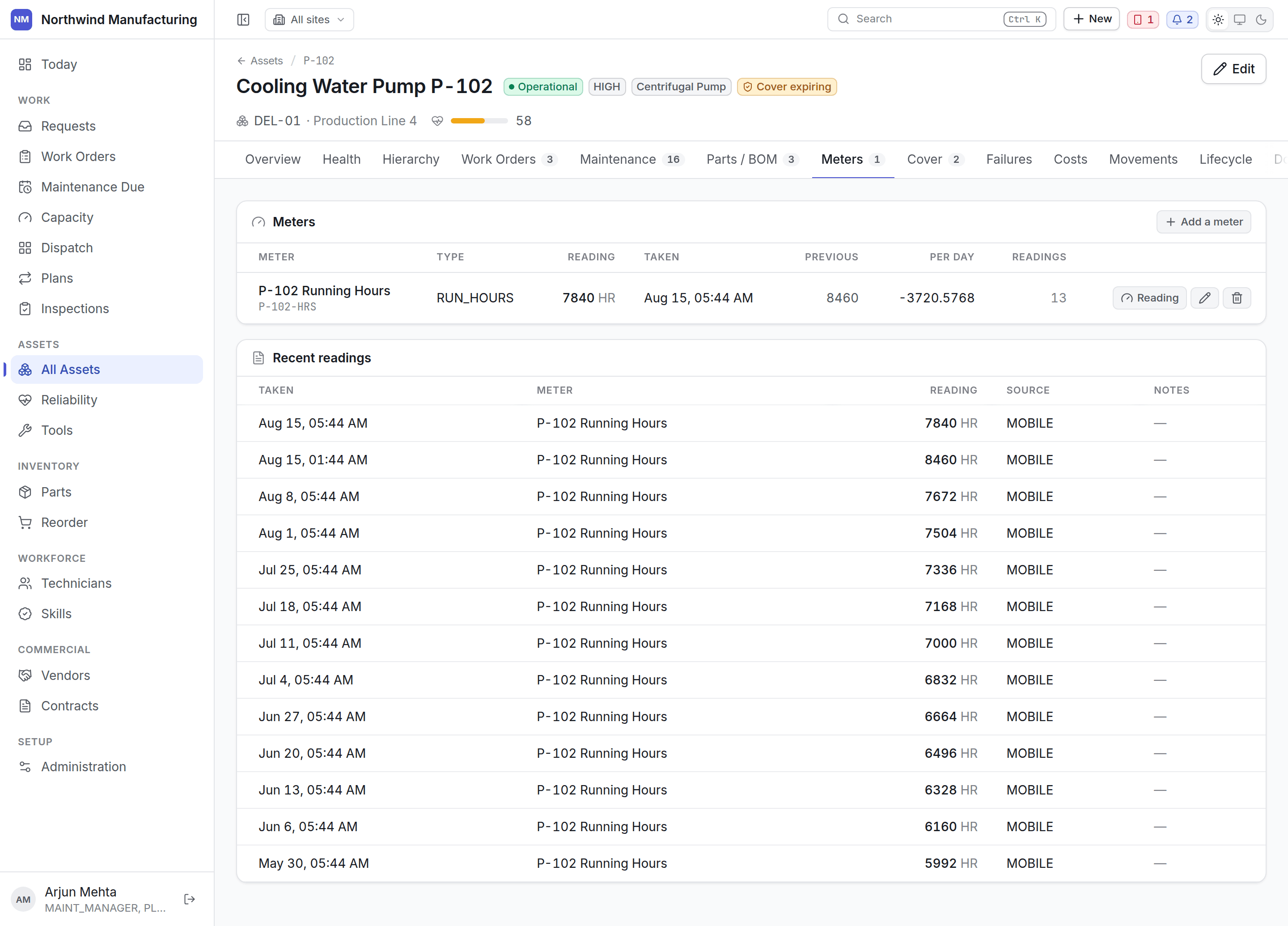 Each meter shows its readings over time. Readings come from technicians on the handset, from
manual entry here, or from a condition-monitoring feed.
Meters drive meter-based [maintenance triggers](/maintenance/plan-builder) — *every 2,000 run
hours* needs somebody to be recording run hours.
Who pays if this breaks: the contracts and warranties covering this machine, together.
Each meter shows its readings over time. Readings come from technicians on the handset, from
manual entry here, or from a condition-monitoring feed.
Meters drive meter-based [maintenance triggers](/maintenance/plan-builder) — *every 2,000 run
hours* needs somebody to be recording run hours.
Who pays if this breaks: the contracts and warranties covering this machine, together.
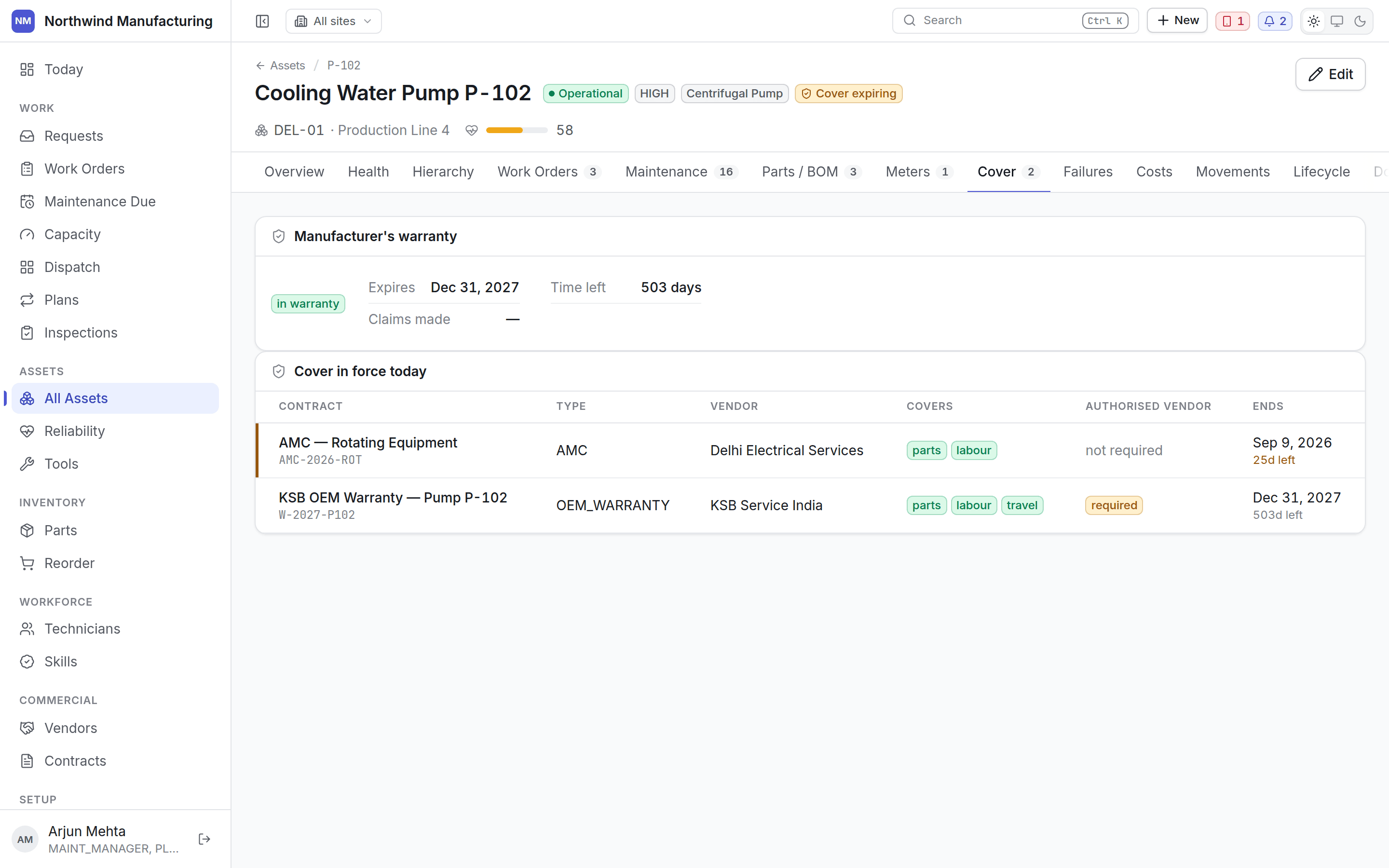 Warranty and contracts share a tab deliberately. Both answer the same question, and a warranty
tab a planner has to remember to open is how a repair gets billed internally on a machine the
manufacturer would have covered.
See [entitlements and claims](/commercial/entitlements).
What has actually broken, with a count of what is still open. Failures drive MTBF, downtime and
the bad-actor ranking on [Reliability](/assets/reliability).
What this machine has cost to maintain — labour, parts, tools, travel, vendor charges — over
time. Read against purchase cost, this is the replacement argument.
Where this asset has been. Transfers between locations and sites, with dates and who moved it.
Its state history — planned, received, commissioned, in service, down, retired, disposed — with
dates. See [the asset lifecycle](/assets/lifecycle).
Time this machine spent in a state your model counts as down, and what it cost in availability.
Manuals, drawings, certificates, photographs. The tab carries the count.
Ask for a diagnosis or for help with this machine, using its own history and its recorded
failures. Suggestions are proposals — nothing reaches the record until somebody accepts one.
The tab is here because the useful place to ask what is wrong with a pump is on the pump. It is
empty until your organisation has agreed to switch the copilot on. See
[Copilot](/analytics/copilot).
Every change to this record in order, plus comments.
Full field-level change history. Visible to roles carrying audit permission.
## Editing
**Edit** in the header opens the record. Assets are edited here rather than in Administration,
because the context — the meters, the work history, the cover — is the reason this screen exists.
## Related topics
- [The asset register](/assets/register.md)
- [Entitlements and claims](/commercial/entitlements.md)
- [Inside a part](/inventory/part-detail.md)
- [Inside a work order](/work/work-order-detail.md)
- [Inside a technician](/workforce/technician-detail.md)
Warranty and contracts share a tab deliberately. Both answer the same question, and a warranty
tab a planner has to remember to open is how a repair gets billed internally on a machine the
manufacturer would have covered.
See [entitlements and claims](/commercial/entitlements).
What has actually broken, with a count of what is still open. Failures drive MTBF, downtime and
the bad-actor ranking on [Reliability](/assets/reliability).
What this machine has cost to maintain — labour, parts, tools, travel, vendor charges — over
time. Read against purchase cost, this is the replacement argument.
Where this asset has been. Transfers between locations and sites, with dates and who moved it.
Its state history — planned, received, commissioned, in service, down, retired, disposed — with
dates. See [the asset lifecycle](/assets/lifecycle).
Time this machine spent in a state your model counts as down, and what it cost in availability.
Manuals, drawings, certificates, photographs. The tab carries the count.
Ask for a diagnosis or for help with this machine, using its own history and its recorded
failures. Suggestions are proposals — nothing reaches the record until somebody accepts one.
The tab is here because the useful place to ask what is wrong with a pump is on the pump. It is
empty until your organisation has agreed to switch the copilot on. See
[Copilot](/analytics/copilot).
Every change to this record in order, plus comments.
Full field-level change history. Visible to roles carrying audit permission.
## Editing
**Edit** in the header opens the record. Assets are edited here rather than in Administration,
because the context — the meters, the work history, the cover — is the reason this screen exists.
## Related topics
- [The asset register](/assets/register.md)
- [Entitlements and claims](/commercial/entitlements.md)
- [Inside a part](/inventory/part-detail.md)
- [Inside a work order](/work/work-order-detail.md)
- [Inside a technician](/workforce/technician-detail.md)