> ## Documentation Index
> Fetch the complete documentation index at: https://docs.assetinfinity.ai/llms.txt
> Use this file to discover all available pages before exploring further.
# Inside a vendor
> Contacts, the sites they cover, their capabilities, contracts, work, performance, rates and compliance.
A vendor is assembled on this screen and nowhere else — nearly everything here is edited in place,
because it all arrives by somebody typing what an agreement says.
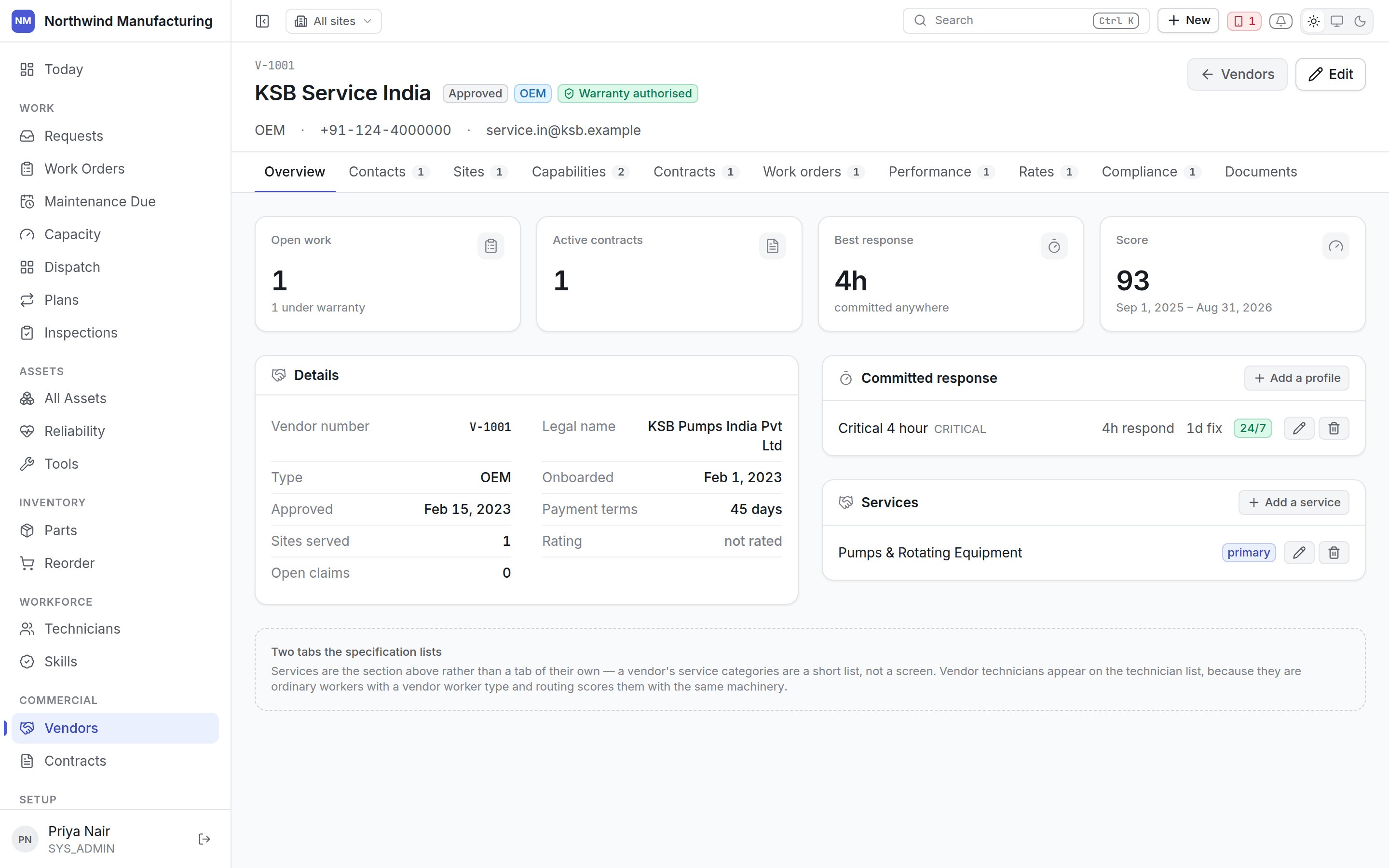 ## Compliance first
The header leads with compliance. A vendor whose insurance has lapsed cannot be sent, and that
should be the first thing anybody looking at them learns — not a detail on the ninth tab.
## Tabs
Identity, status, type and category, and the **service categories** they are engaged for — three
words rather than a screen, so they live here.
Who to call. Mark the **primary** contact and any **escalation** contacts, so an out-of-hours
breakdown reaches somebody who can act rather than a general mailbox.
Which of your sites this vendor covers. A contractor approved for one plant is not automatically
approved for another.
The skills and certifications this vendor holds. Routing uses them the same way it uses a
technician's: a job requiring a skill they do not hold will not be recommended to them.
Agreements with this vendor — warranties, AMCs, CMCs, service agreements. See
[contracts](/commercial/contracts).
Jobs sent to them, open and historical. **Read-only** — work is assigned from the job, not from
here.
Computed from what they actually did: response times against promise, resolution times, first-time
fix, and jobs returned. **Read-only**, because it is derived rather than entered.
The rate card — labour rates by skill and by hours, call-out charges, travel, and the currency
each is in. What their invoices should say, and what jobs sent to them are costed at.
Insurance, licences, safety accreditations and health-and-safety documents, each with an expiry.
Expiring documents raise a [notification](/config/notifications) ahead of time.
## Sending work to a vendor
Assign the job to the vendor from the work order. The [entitlement](/commercial/entitlements) check
runs then: if a contract covers the repair, the job is raised against it and the cost falls where the
agreement says.
A work order waiting on a contractor sits in **Waiting for Vendor**, which pauses the service-level
clock. See [the lifecycle](/work/lifecycle).
## Related topics
- [Vendors](/commercial/vendors.md)
- [Inside an asset](/assets/detail.md)
- [Inside a work order](/work/work-order-detail.md)
- [Entitlements and claims](/commercial/entitlements.md)
- [Inside a part](/inventory/part-detail.md)
## Compliance first
The header leads with compliance. A vendor whose insurance has lapsed cannot be sent, and that
should be the first thing anybody looking at them learns — not a detail on the ninth tab.
## Tabs
Identity, status, type and category, and the **service categories** they are engaged for — three
words rather than a screen, so they live here.
Who to call. Mark the **primary** contact and any **escalation** contacts, so an out-of-hours
breakdown reaches somebody who can act rather than a general mailbox.
Which of your sites this vendor covers. A contractor approved for one plant is not automatically
approved for another.
The skills and certifications this vendor holds. Routing uses them the same way it uses a
technician's: a job requiring a skill they do not hold will not be recommended to them.
Agreements with this vendor — warranties, AMCs, CMCs, service agreements. See
[contracts](/commercial/contracts).
Jobs sent to them, open and historical. **Read-only** — work is assigned from the job, not from
here.
Computed from what they actually did: response times against promise, resolution times, first-time
fix, and jobs returned. **Read-only**, because it is derived rather than entered.
The rate card — labour rates by skill and by hours, call-out charges, travel, and the currency
each is in. What their invoices should say, and what jobs sent to them are costed at.
Insurance, licences, safety accreditations and health-and-safety documents, each with an expiry.
Expiring documents raise a [notification](/config/notifications) ahead of time.
## Sending work to a vendor
Assign the job to the vendor from the work order. The [entitlement](/commercial/entitlements) check
runs then: if a contract covers the repair, the job is raised against it and the cost falls where the
agreement says.
A work order waiting on a contractor sits in **Waiting for Vendor**, which pauses the service-level
clock. See [the lifecycle](/work/lifecycle).
## Related topics
- [Vendors](/commercial/vendors.md)
- [Inside an asset](/assets/detail.md)
- [Inside a work order](/work/work-order-detail.md)
- [Entitlements and claims](/commercial/entitlements.md)
- [Inside a part](/inventory/part-detail.md)