> ## Documentation Index
> Fetch the complete documentation index at: https://docs.assetinfinity.ai/llms.txt
> Use this file to discover all available pages before exploring further.
# Building a maintenance plan
> The twelve-step builder — scope, triggers, tasks, requirements, safety, scheduling and activation.
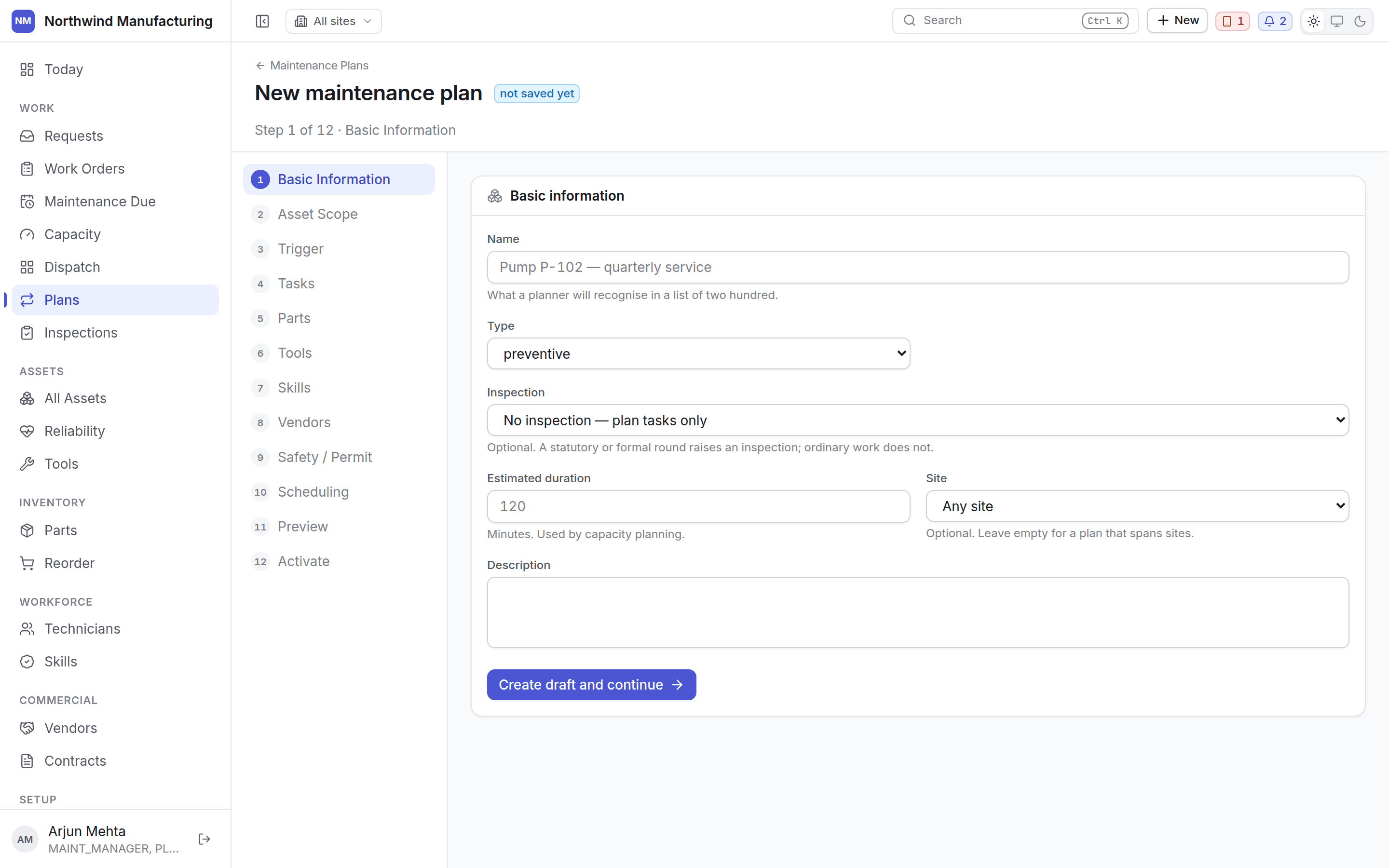
The builder walks you through twelve steps. The plan exists from the end of step one, so you can
leave and come back without losing anything.
 A plan generates nothing until you activate it at step twelve. Half-built is inert, not dangerous.
Start from **Work → Plans → New**.
Name the plan, give it a number, say what it is for. Choose the work order **type** that rounds
will be raised as — normally a preventive type — and the **priority**, which carries the service
level.
Saving this step creates the plan as a draft.
Which machines the plan covers. Either name assets individually, or describe them — every asset
of a given type, category or criticality, at a site or below a point in the location tree.
A described scope keeps working as the plant changes: commission another pump of that type and
it comes into scope without anyone remembering to add it.
When a round comes due. A plan may carry **several** triggers, combined with **ANY** (whichever
comes first) or **ALL** (only when every one is met).
| Trigger | Fires on |
| -------------------- | ----------------------------------------------------------------- |
| **Calendar** | An interval — every 30 days, every quarter |
| **Meter or runtime** | A meter passing a threshold — every 2,000 run hours |
| **Event** | Something happening — a breakdown, a commissioning |
| **Condition** | A monitored measurement crossing a limit — vibration, temperature |
ANY is the common choice: *every 90 days or every 2,000 run hours, whichever comes first.*
Set the **tolerance** here too — the window either side of the due date within which the round
still counts as compliant.
The checklist the technician works through. Steps in order; mark which are **mandatory** and
which require **evidence** — a photograph, a signature, a measurement.
Mandatory steps must be complete before the job can be closed, on the handset as well as here.
Parts every round consumes — a filter, a seal kit, five litres of oil. These become
[requirements](/work/work-order-detail) on each work order raised, which is what lets the
readiness check warn you before somebody is sent, and what lets
[reorder](/inventory/reorder) forecast planned demand.
Instruments the round needs. A tool that is out, unusable or out of calibration will show as a
shortage on readiness.
What the person doing this must be able to do, and any **certification** they must hold. Routing
and dispatch both use this; an expired certification stops an assignment.
Where the round is done by a contractor rather than in-house. Name the vendor, or the service
category, and the entitlement check will look for a contract that covers it.
Hazards, isolation requirements, and whether a permit to work is required before the job may
start. A permit requirement appears on readiness like any other.
How long a round takes — the estimate the [capacity plan](/work/capacity) weighs — how far ahead
work orders should be raised, and whether rounds may be grouped so two plans falling in the same
week become one visit.
The occurrences this plan would raise over the coming period, on which assets, on which dates.
Read it before activating — this is where a trigger that fires daily instead of monthly becomes
obvious.
Turn it on. From here the plan raises occurrences, and they appear on
[Maintenance Due](/work/maintenance-due).
## Editing later
**Edit** on the plan reopens the builder. Each step saves as you complete it.
Steps 5 to 8 — parts, tools, skills and vendors — are one requirement list to the system. The
builder always sends all four together, so use the builder rather than editing requirements
piecemeal elsewhere.
Changes apply to occurrences not yet raised. Work orders already created keep the requirements they
were raised with, because a job somebody is part-way through should not change under them.
## Related topics
- [Maintenance plans](/maintenance/plans.md)
- [Core concepts](/core-concepts.md)
- [Maintenance due](/work/maintenance-due.md)
- [The capacity plan](/work/capacity.md)
- [Creating an organisation](/setup/sign-up.md)
A plan generates nothing until you activate it at step twelve. Half-built is inert, not dangerous.
Start from **Work → Plans → New**.
Name the plan, give it a number, say what it is for. Choose the work order **type** that rounds
will be raised as — normally a preventive type — and the **priority**, which carries the service
level.
Saving this step creates the plan as a draft.
Which machines the plan covers. Either name assets individually, or describe them — every asset
of a given type, category or criticality, at a site or below a point in the location tree.
A described scope keeps working as the plant changes: commission another pump of that type and
it comes into scope without anyone remembering to add it.
When a round comes due. A plan may carry **several** triggers, combined with **ANY** (whichever
comes first) or **ALL** (only when every one is met).
| Trigger | Fires on |
| -------------------- | ----------------------------------------------------------------- |
| **Calendar** | An interval — every 30 days, every quarter |
| **Meter or runtime** | A meter passing a threshold — every 2,000 run hours |
| **Event** | Something happening — a breakdown, a commissioning |
| **Condition** | A monitored measurement crossing a limit — vibration, temperature |
ANY is the common choice: *every 90 days or every 2,000 run hours, whichever comes first.*
Set the **tolerance** here too — the window either side of the due date within which the round
still counts as compliant.
The checklist the technician works through. Steps in order; mark which are **mandatory** and
which require **evidence** — a photograph, a signature, a measurement.
Mandatory steps must be complete before the job can be closed, on the handset as well as here.
Parts every round consumes — a filter, a seal kit, five litres of oil. These become
[requirements](/work/work-order-detail) on each work order raised, which is what lets the
readiness check warn you before somebody is sent, and what lets
[reorder](/inventory/reorder) forecast planned demand.
Instruments the round needs. A tool that is out, unusable or out of calibration will show as a
shortage on readiness.
What the person doing this must be able to do, and any **certification** they must hold. Routing
and dispatch both use this; an expired certification stops an assignment.
Where the round is done by a contractor rather than in-house. Name the vendor, or the service
category, and the entitlement check will look for a contract that covers it.
Hazards, isolation requirements, and whether a permit to work is required before the job may
start. A permit requirement appears on readiness like any other.
How long a round takes — the estimate the [capacity plan](/work/capacity) weighs — how far ahead
work orders should be raised, and whether rounds may be grouped so two plans falling in the same
week become one visit.
The occurrences this plan would raise over the coming period, on which assets, on which dates.
Read it before activating — this is where a trigger that fires daily instead of monthly becomes
obvious.
Turn it on. From here the plan raises occurrences, and they appear on
[Maintenance Due](/work/maintenance-due).
## Editing later
**Edit** on the plan reopens the builder. Each step saves as you complete it.
Steps 5 to 8 — parts, tools, skills and vendors — are one requirement list to the system. The
builder always sends all four together, so use the builder rather than editing requirements
piecemeal elsewhere.
Changes apply to occurrences not yet raised. Work orders already created keep the requirements they
were raised with, because a job somebody is part-way through should not change under them.
## Related topics
- [Maintenance plans](/maintenance/plans.md)
- [Core concepts](/core-concepts.md)
- [Maintenance due](/work/maintenance-due.md)
- [The capacity plan](/work/capacity.md)
- [Creating an organisation](/setup/sign-up.md)