> ## Documentation Index
> Fetch the complete documentation index at: https://docs.assetinfinity.ai/llms.txt
> Use this file to discover all available pages before exploring further.
# People and access
> Users, the roles that say what they can do, and the site and asset scope that says how widely they reach.
Who can do what, and how widely.
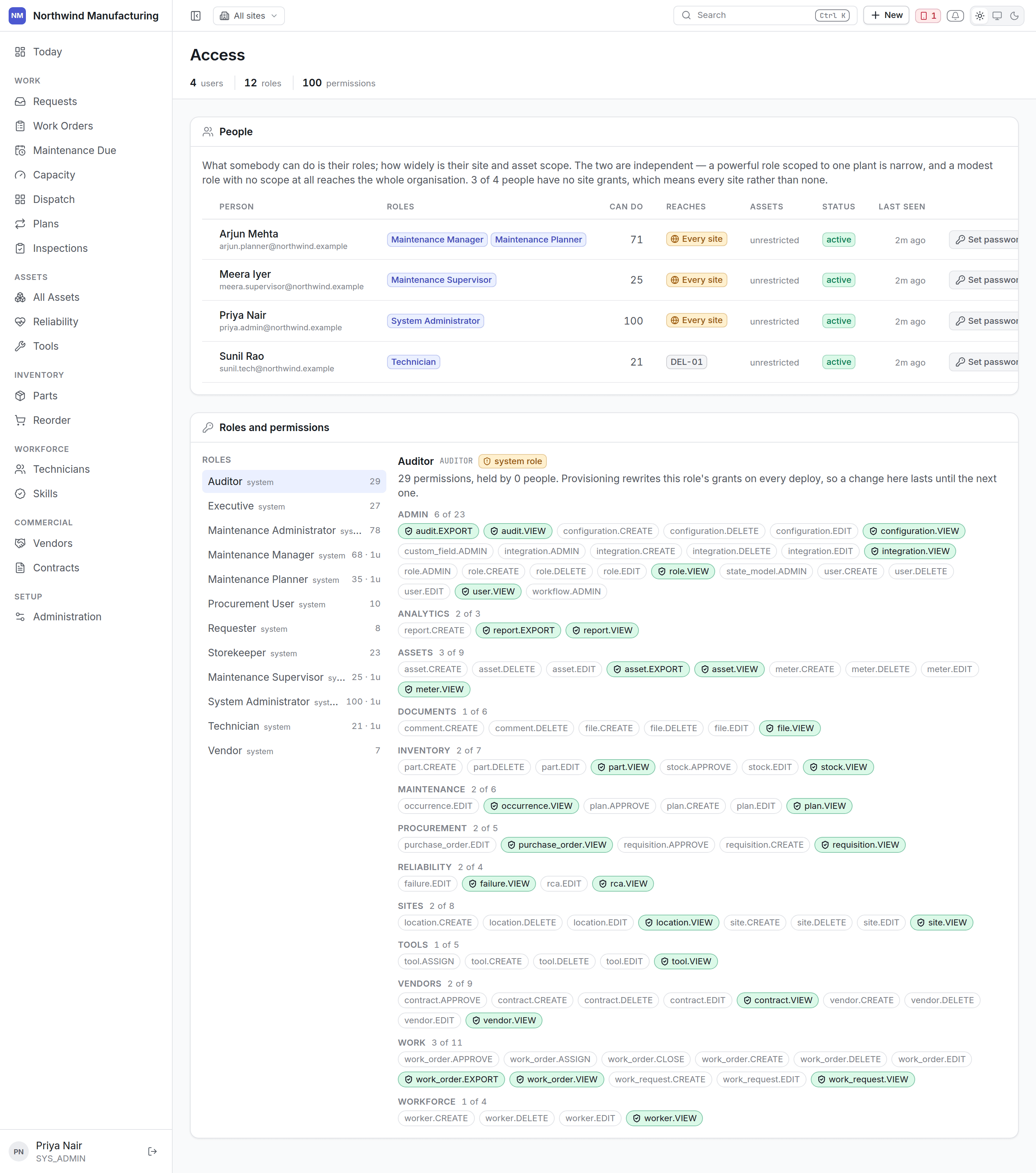 ## Why this is one screen
Roles, site scope and asset scope only mean anything **together**. Edited as three unrelated tables
they are how somebody grants far more than they meant to.
## The rule that catches people out
**No grants means unrestricted.** A user with no site rows can see **every** site.
So adding somebody's first site silently narrows them from everything to one, and deleting their
last silently widens them to everything. In a plain table those two edits look identical and are
opposite in effect.
This screen says **"every site"** in as many words where that is the situation, rather than leaving
a blank column that says nothing.
## Adding a user
**New** on this screen.
| Field | Notes |
| --------------------------- | ----------------------------------------------------------------------------- |
| **Name** and **email** | The email is what they sign in with |
| **Roles** | One or more. See [roles](/setup/roles) |
| **Site access** | Which sites. Leave empty only if you mean every site |
| **Asset access** | Optional, narrower still — for a contractor who may see only certain machines |
| **Timezone** and **locale** | Affects how dates and numbers are shown to them |
The user is issued a password and asked to change it on first sign-in, because somebody other than
its owner knows it.
## Roles
A role is a bundle of permissions. Give somebody more than one and they get the union.
The twelve defaults cover most plants. See [the role reference](/setup/roles) for exactly what each
can do.
## Site and asset scope
Two levels of narrowing, both optional:
* **Site access** — which plants this person may reach.
* **Asset access** — which machines, for cases where even one site is too wide. A contractor
maintaining only the compressors is the usual reason.
Scope is enforced by the server on every read, not by hiding menu items. A user who cannot reach a
site cannot reach it by typing a URL either.
## Changing somebody's access
Changes take effect on their next request. Somebody whose access is narrowed while signed in stops
seeing what they lost immediately — they do not need to sign out.
## Deactivating somebody
Deactivate rather than delete. Their history — the jobs they closed, the hours they booked, the
readings they took — stays attached to them, which is what makes the record worth having. A deleted
user would orphan all of it.
Deactivating ends their sessions. If they had a [handset](/field/sign-in), revoke the device too,
from the [Sync Center](/field/sync-center).
## Users and workers
Different records. A **user** signs in; a **worker** does maintenance. Most technicians are both,
and linking them is what lets the app know whose work "my work" means. Workers are managed under
[technicians](/workforce/technicians).
## Related topics
- [Role reference](/setup/roles.md)
- [What this system does](/introduction.md)
- [Setting up the plant](/setup/overview.md)
- [Creating an organisation](/setup/sign-up.md)
- [Core concepts](/core-concepts.md)
## Why this is one screen
Roles, site scope and asset scope only mean anything **together**. Edited as three unrelated tables
they are how somebody grants far more than they meant to.
## The rule that catches people out
**No grants means unrestricted.** A user with no site rows can see **every** site.
So adding somebody's first site silently narrows them from everything to one, and deleting their
last silently widens them to everything. In a plain table those two edits look identical and are
opposite in effect.
This screen says **"every site"** in as many words where that is the situation, rather than leaving
a blank column that says nothing.
## Adding a user
**New** on this screen.
| Field | Notes |
| --------------------------- | ----------------------------------------------------------------------------- |
| **Name** and **email** | The email is what they sign in with |
| **Roles** | One or more. See [roles](/setup/roles) |
| **Site access** | Which sites. Leave empty only if you mean every site |
| **Asset access** | Optional, narrower still — for a contractor who may see only certain machines |
| **Timezone** and **locale** | Affects how dates and numbers are shown to them |
The user is issued a password and asked to change it on first sign-in, because somebody other than
its owner knows it.
## Roles
A role is a bundle of permissions. Give somebody more than one and they get the union.
The twelve defaults cover most plants. See [the role reference](/setup/roles) for exactly what each
can do.
## Site and asset scope
Two levels of narrowing, both optional:
* **Site access** — which plants this person may reach.
* **Asset access** — which machines, for cases where even one site is too wide. A contractor
maintaining only the compressors is the usual reason.
Scope is enforced by the server on every read, not by hiding menu items. A user who cannot reach a
site cannot reach it by typing a URL either.
## Changing somebody's access
Changes take effect on their next request. Somebody whose access is narrowed while signed in stops
seeing what they lost immediately — they do not need to sign out.
## Deactivating somebody
Deactivate rather than delete. Their history — the jobs they closed, the hours they booked, the
readings they took — stays attached to them, which is what makes the record worth having. A deleted
user would orphan all of it.
Deactivating ends their sessions. If they had a [handset](/field/sign-in), revoke the device too,
from the [Sync Center](/field/sync-center).
## Users and workers
Different records. A **user** signs in; a **worker** does maintenance. Most technicians are both,
and linking them is what lets the app know whose work "my work" means. Workers are managed under
[technicians](/workforce/technicians).
## Related topics
- [Role reference](/setup/roles.md)
- [What this system does](/introduction.md)
- [Setting up the plant](/setup/overview.md)
- [Creating an organisation](/setup/sign-up.md)
- [Core concepts](/core-concepts.md)