

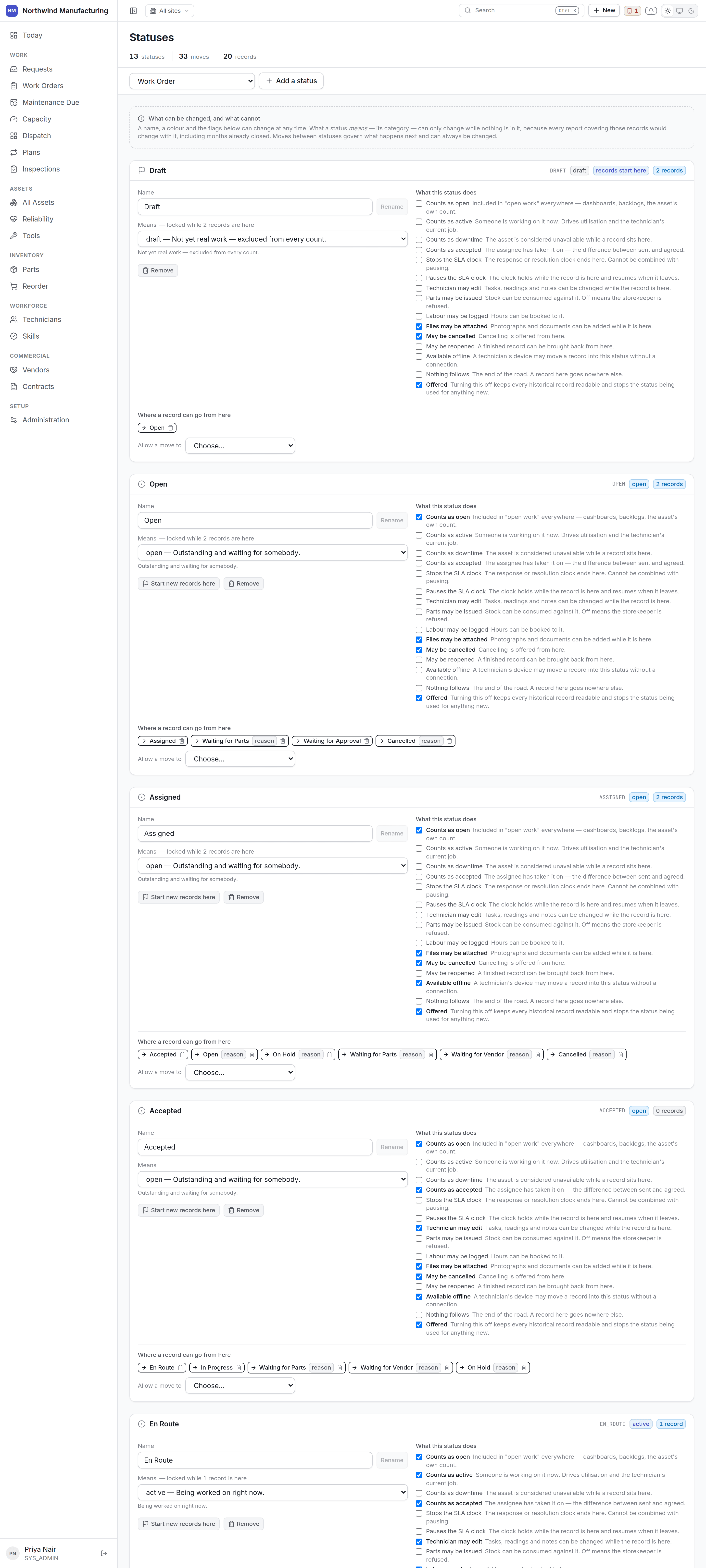
What a status decides
A status is not a label. Its flags change what the product does:
Thirteen checkboxes in a generic form would be thirteen unexplained levers, which is why this screen
exists and why generic administration is kept away from it.
The one rule
So every status shows its occupancy — how many records sit in it right now — and the category control disables itself when that count is above zero, and says why. If it did not, changing a status’s category would silently rewrite history: every chart counting “open” would change its answer about last year. To change a category anyway, move the records out first. Transitions are freely editable at all times, because changing where a record may go next affects only the future.Renaming
Always safe. RenameWAITING_PARTS to “Awaiting spares” and the label changes everywhere — the
list chips, the board columns, the notifications — while every report keeps counting it as on hold,
because reports count the category, not the name.
Adding a status
Choose its name and its category, then set its flags. Add transitions into and out of it, or nothing will ever reach it. A worked example — a fourth on-hold state, Waiting for Access, for jobs blocked because production will not release the machine:1
Create it
Category On hold. Pauses the SLA clock. Not open to technician edit.
2
Transitions in
From Assigned, Accepted and In Progress — the states a job can be blocked from.
3
Transitions out
Back to Assigned (“Access granted”) and to In Progress (“Resume”).
4
Check the result
A new chip appears on the work order list and a new column on
dispatch, automatically.
Transitions
Drawn per status rather than as a grid — a 13×13 matrix of checkboxes is unreadable. Each transition carries:- Its label, which is what the button says. “Wait for parts” reads better than
AWAIT_PARTS. - Whether it requires approval.
- Whether it needs a reason, which is right for anything that undoes or blocks.
- Whether it is available offline on the handset.
The shape of the model
Above the lists, the same model is drawn as a diagram: a box per status, an arrow per allowed move. The list is the right way to edit a status. What it cannot show is the shape — whether the model has a dead end, whether anything ever comes back from Cancelled, whether the path from open to closed is three steps or seven. That is a question about the whole model at once.- Drag a box to arrange the diagram.
- Drag from the dot on a box’s right edge to another status to allow that move.
- Click an arrow to open it.
What stands on a transition
Selecting an arrow opens four things, none of which had anywhere to live before.What has to be true
What has to be true
A condition over the record, checked before anything is written. The same builder the
rules screen uses: groups combined with all of these or any one of
these, and not where you need it.You also write what to tell somebody it refuses — the sentence they see instead of the move
happening. “Record what was wrong before closing this” beats a generic refusal.A condition the server cannot read does not block the move. It is recorded as unevaluable
instead, because a mistake in a condition must not strand a job at two in the morning.
Who may make this move
Who may make this move
A permission code, kept deliberately separate from the condition above. A condition is about the
record, and who is asking is not a property of the record.A move marked as needing approval additionally requires the approving permission for that record
type — and cannot be made by anything running in the background.
What has to be filled in
What has to be filled in
Fields that must have a value before this particular move is allowed. Both the product’s own
fields and your custom fields are offered.This is how “you cannot close a job without a resolution code” is expressed, rather than by
making the field mandatory everywhere.
What happens afterwards
What happens afterwards
Actions that run once the move has actually happened, so none of them can undo it. Each says
whether it runs immediately or in the background.